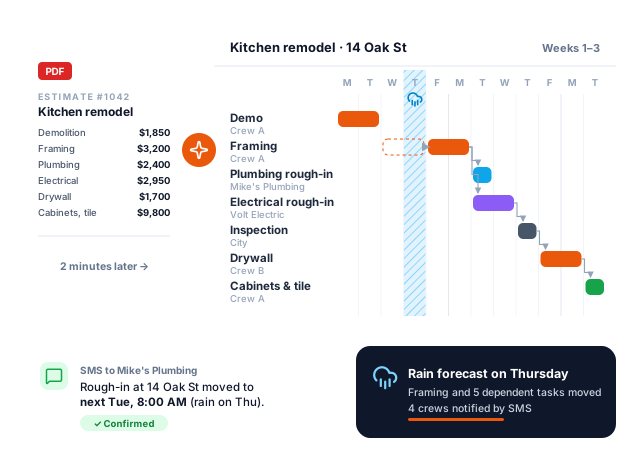
Turn your estimate into a crew-ready construction schedule in 2 minutes
Upload an estimate PDF or describe the job. Jobsite Scheduler drafts the Gantt chart, the task dependencies and the crew assignments, reshuffles them when rain or a late delivery pushes a task, and texts every crew their dates. No app to install, no account for your crews.
Built for remodelers, specialty trades and small GCs
One flat price for the company, not per user
Crews and subs see their dates by link or SMS
Join the early access list
Be among the first contractors to try it. Founding members get 50 % off for life.
Why Jobsite Scheduler
The schedule your crews actually follow, without the hours in a spreadsheet
From estimate to schedule, not from a blank Gantt
Drop your estimate or type a few lines about the job. The AI breaks it into phases and tasks, sets realistic durations and links what must happen in order: demo before framing, rough-in before drywall, inspection before cover-up.
Rain day or late delivery? It reschedules
Flag a weather day or a delayed task: everything that depends on it moves, and you review what changed before anyone is notified.
Crews get their dates by text, no login
Each crew lead and subcontractor gets a private link by SMS or email with only their tasks and dates. They confirm with one tap, without downloading anything.
Sized and priced for 2 to 50 people
One flat monthly price for the company. Made for contractors who have outgrown the whiteboard but do not need an enterprise construction suite.
How it works
Three steps from estimate to jobsite
1
Upload your estimate or describe the job
A PDF estimate, a photo of a typed quote, or a few sentences: "kitchen remodel, 180 sq ft, new cabinets, tile backsplash, two electricians".
2
Review the schedule the AI drafts
Phases, tasks, durations, dependencies and crews on a Gantt chart. Drag a bar, swap a crew, lock a date: it stays your schedule.
3
Share it, and let it adapt
Send each crew and sub their link. When weather or a delay hits, update one task and only the people affected get the new dates.
Honest comparison
How it compares to the tools you have heard of
Most construction software is built for general contractors running large projects, with per-user or quote-based pricing. Jobsite Scheduler only does scheduling, for small teams. If you need a full suite, the tools below are the better fit.
Tool
Entry price (public)
Built for
Jobsite Scheduler planned
$29/month flat ($14.50 for founding members)
Small contractors and subs: AI schedule from an estimate, weather and delay rescheduling, crew links without accounts.
Enterprise construction management for GCs and owners.
Prices taken from each vendor's public pricing page on October 4, 2026, and may have changed since. Jobsite Scheduler is not available yet: its row describes what we are building.
Pricing
One simple price, half off for life if you join early
No per-seat fees: your crews, subs and office staff are included. Joining the early access list is free and commits you to nothing.
Planned price
$29/month
Founding members: $14.50/month for life (50 % off)
AI schedule from an estimate PDF or a job description
Gantt chart with dependencies and crew assignments
Weather and delay rescheduling with review before sending
Crew and subcontractor links by SMS or email, no accounts
We are building it now and will open access in small batches to the people on the early access list, in the order they joined. We will email you when your spot opens. No date is promised until the product is ready.
How much will it cost?
The planned price is $29 per month for the whole company, not per user. Founding members, the people on the early access list who subscribe during early access, keep 50 % off for life: $14.50 per month.
What kind of estimates can it read?
PDF estimates and quotes exported from estimating software, accounting tools or spreadsheets, and photos of typed estimates. If you do not have one, a few sentences describing the job are enough for a first draft.
Do my crews and subcontractors need an account?
No. Each person receives a private link by text message or email showing their own tasks and dates. They can confirm or flag a problem without installing an app or creating an account.
How does weather and delay rescheduling work?
You mark which tasks are weather-sensitive, such as concrete, roofing or exterior paint. When you flag a rain day or a late task, Jobsite Scheduler proposes a new schedule that moves every dependent task. You approve it before anyone is notified.
Does it replace Procore or Buildertrend?
No. Those are full construction management suites with bids, budgets, documents and client portals. Jobsite Scheduler does one job, the schedule and keeping crews on it. If scheduling is what you need, it is simpler and cheaper; if you need the whole suite, they are the better fit.
Which countries will it work in?
It is planned in English for the United States, the United Kingdom, Canada and Australia, with local date formats, units and SMS delivery.
What happens to my email?
It is used only to contact you about early access and is never sold or shared. You can ask us to delete it at any time by writing to contact@jobsitescheduler.com.
Stop rebuilding the schedule every time it rains
Join the early access list: tell us how you schedule today and we will build Jobsite Scheduler around the problems you actually have.